Monitoring Router Data Usage with Python (Linux & Windows)
Most routers have a hidden goldmine of usage stats—if you know where to look. I got tired of manually checking how much data we were using on our 300GB monthly plan, especially with big downloads and shared WiFi. So I wrote a Python script that:
Logs into the router
Grabs monthly and daily data usage
Warns when I hit a usage threshold
Shows total time online
Works on both Windows and Linux
Only runs once a day to avoid lag
No more surprises from the ISP.
How It Works
My router is a Huawei model with a web interface at http://192.168.8.1. It exposes data usage stats at this endpoint:
http://192.168.8.1/api/monitoring/month_statistics
The router responds with XML, so the script uses basic string slicing to extract values like:
<CurrentMonthDownload><CurrentMonthUpload><MonthDuration><CurrentDayUsed>, etc.
Windows Version: GUI Notification
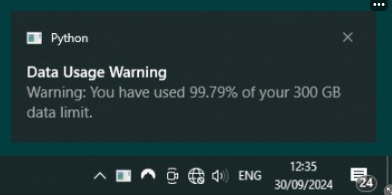
On Windows, I use the plyer package to pop up a notification if usage crosses 90% of the monthly cap.
pip install plyer
Here’s the script:
import requests
from datetime import timedelta
from plyer import notification

# Router URL
base_url = "http://192.168.8.1"
login_url = f"{base_url}/html/index.html"

# Login credentials
password = "Password123"  # Change this to your actual router's login password

# Step 1: Log in to the router
login_payload = {
    'Password': password
}
headers = {
    'Content-Type': 'application/x-www-form-urlencoded'
}

# Session to persist cookies and headers
session = requests.Session()

# You may need to modify this login step depending on your router's login form
login_response = session.post(login_url, data=login_payload, headers=headers)

if login_response.status_code == 200:
    print("Login successful")
else:
    print("Login failed!")
    exit()

# Router URL for data usage statistics
stats_url = "http://192.168.8.1/api/monitoring/month_statistics"

# Data limit in bytes (300GB = 300 * 1024^3)
data_limit = 300 * 1024 * 1024 * 1024
threshold = 0.9  # 90% usage threshold

# Step 1: Fetch data usage statistics from the router
response = session.get(stats_url)

if response.status_code == 200:
    # Parse XML response
    data = response.text
    download_start = data.find("<CurrentMonthDownload>") + len("<CurrentMonthDownload>")
    download_end = data.find("</CurrentMonthDownload>")
    upload_start = data.find("<CurrentMonthUpload>") + len("<CurrentMonthUpload>")
    upload_end = data.find("</CurrentMonthUpload>")
    duration_start = data.find("<MonthDuration>") + len("<MonthDuration>")
    duration_end = data.find("</MonthDuration>")
    clear_time_start = data.find("<MonthLastClearTime>") + len("<MonthLastClearTime>")
    clear_time_end = data.find("</MonthLastClearTime>")
    day_used_start = data.find("<CurrentDayUsed>") + len("<CurrentDayUsed>")
    day_used_end = data.find("</CurrentDayUsed>")
    day_duration_start = data.find("<CurrentDayDuration>") + len("<CurrentDayDuration>")
    day_duration_end = data.find("</CurrentDayDuration>")

    # Extract values
    current_download = int(data[download_start:download_end])
    current_upload = int(data[upload_start:upload_end])
    month_duration = int(data[duration_start:duration_end])
    last_clear_time = data[clear_time_start:clear_time_end]
    current_day_used = int(data[day_used_start:day_used_end])
    current_day_duration = int(data[day_duration_start:day_duration_end])

    # Calculate total data usage
    total_usage = current_download + current_upload
    usage_percentage = total_usage / data_limit * 100

    print(f"Total usage: {total_usage / (1024 ** 3):.2f} GB ({usage_percentage:.2f}% of 300 GB limit)")

    if usage_percentage >= threshold * 100:
        warning_message = f"Warning: You have used {usage_percentage:.2f}% of your 300 GB data limit."
        print(warning_message)

        # Show Windows pop-up notification
        notification.notify(
            title="Data Usage Warning",
            message=warning_message,
            app_name="Data Usage Monitor",
            timeout=10  # Notification lasts for 10 seconds
        )
    else:
        print("Data usage is below the warning threshold.")

    # Month and day statistics
    print(f"Data usage for the current day: {current_day_used / (1024 ** 3):.2f} GB")

    # Convert MonthDuration and CurrentDayDuration from seconds to a more readable format (hours, minutes)
    month_duration_readable = str(timedelta(seconds=month_duration))
    current_day_duration_readable = str(timedelta(seconds=current_day_duration))

    print(f"Total online time this month: {month_duration_readable}")
    print(f"Total online time today: {current_day_duration_readable}")
    print(f"Last data reset date: {last_clear_time}")
else:
    print(f"Failed to retrieve data usage statistics. Status code: {response.status_code}")
It also prints:
Total GB used
Current day usage
Last reset date
Time online this month and today
Linux Version: Terminal-Only
Since notify-send doesn’t work reliably with WSL or headless systems, the Linux version sticks to terminal output only:
print(f"Total WiFi usage: {usage:.2f} GB ({usage_percentage:.2f}%)")

if usage_percentage >= 80:
    print("*** Warning: You have used 80% of your 300 GB limit ***")
else:
    print("WiFi usage is below the warning threshold ✓")
I use subprocess.run() if I want to hook in notify-send, but keep it disabled by default.
root@RHAYDEN:/home/rhayden/scripts# cat wifi_data_usage_checker.py
import requests
from datetime import timedelta
import subprocess

# Router URL
base_url = "http://192.168.8.1"
login_url = f"{base_url}/html/index.html"

# Login credentials
password = "Password123"

# Step 1: Log in to the router
login_payload = {
    'Password': password
}
headers = {
    'Content-Type': 'application/x-www-form-urlencoded'
}

# Session to persist cookies and headers
session = requests.Session()

# You may need to modify this login step depending on your router's login form
login_response = session.post(login_url, data=login_payload, headers=headers)

if login_response.status_code == 200:
    print("Login successful")
else:
    print("Login failed!")
    exit()

# Router URL for data usage statistics
stats_url = "http://192.168.8.1/api/monitoring/month_statistics"

# Data limit in bytes (300GB = 300 * 1024^3)
data_limit = 300 * 1024 * 1024 * 1024
threshold = 0.8  # 80% usage threshold

# Step 1: Fetch data usage statistics from the router
response = session.get(stats_url)

if response.status_code == 200:
    # Parse XML response
    data = response.text
    download_start = data.find("<CurrentMonthDownload>") + len("<CurrentMonthDownload>")
    download_end = data.find("</CurrentMonthDownload>")
    upload_start = data.find("<CurrentMonthUpload>") + len("<CurrentMonthUpload>")
    upload_end = data.find("</CurrentMonthUpload>")
    duration_start = data.find("<MonthDuration>") + len("<MonthDuration>")
    duration_end = data.find("</MonthDuration>")
    clear_time_start = data.find("<MonthLastClearTime>") + len("<MonthLastClearTime>")
    clear_time_end = data.find("</MonthLastClearTime>")
    day_used_start = data.find("<CurrentDayUsed>") + len("<CurrentDayUsed>")
    day_used_end = data.find("</CurrentDayUsed>")
    day_duration_start = data.find("<CurrentDayDuration>") + len("<CurrentDayDuration>")
    day_duration_end = data.find("</CurrentDayDuration>")

    # Extract values
    current_download = int(data[download_start:download_end])
    current_upload = int(data[upload_start:upload_end])
    month_duration = int(data[duration_start:duration_end])
    last_clear_time = data[clear_time_start:clear_time_end]
    current_day_used = int(data[day_used_start:day_used_end])
    current_day_duration = int(data[day_duration_start:day_duration_end])

    # Calculate total data usage
    total_usage = current_download + current_upload
    usage_percentage = total_usage / data_limit * 100

    print(f"Total WiFi data usage: {total_usage / (1024 ** 3):.2f} GB ({usage_percentage:.2f}% of 300 GB monthly limit)")

    if usage_percentage >= threshold * 100:
        warning_message = f"*** Warning: You have used {usage_percentage:.2f}% of your 300 GB monthly data limit ***"
        print(warning_message)

        # Show Windows pop-up notification
        #        notification.notify(
        #            title="Data Usage Warning",
        #            message=warning_message,
        #            app_name="Data Usage Monitor",
        #            timeout=10  # Notification lasts for 10 seconds
        #        )

        # Use notify-send to create a pop-up notification
        #subprocess.run(['notify-send', 'Data Usage Warning', warning_message])
    else:
        print("WiFi data usage for the month is below the warning threshold of 80%, all good ✓")

    # Month and day statistics
    print(f"Data usage for the current day: {current_day_used / (1024 ** 3):.2f} GB")

    # Convert MonthDuration and CurrentDayDuration from seconds to a more readable format (hours, minutes)
    month_duration_readable = str(timedelta(seconds=month_duration))
    current_day_duration_readable = str(timedelta(seconds=current_day_duration))

    print(f"Total online time this month: {month_duration_readable}")
    print(f"Total online time today: {current_day_duration_readable}")
    print(f"Last data reset date: {last_clear_time}")
else:
    print(f"Failed to retrieve data usage statistics. Status code: {response.status_code}")
Once-Per-Day Wrapper
To avoid hammering the router API or slowing down shell startup, I wrapped the script in a Bash check:
# ~/.bashrc
bash ~/scripts/WIFI.sh
Then inside WIFI.sh:
#!/bin/bash

# Define the log file location
LOG_FILE="/tmp/wifi_last_run_time.log"

# Get today's date in YYYY-MM-DD format
TODAY=$(date +%F)

# Check if the log file exists; if not, create it
if [[ ! -f $LOG_FILE ]]; then
    touch $LOG_FILE
fi

# Read the last run date from the log file
LAST_RUN_DATE=$(cat $LOG_FILE)

# Check if the script has already been run today
if [[ "$LAST_RUN_DATE" == "$TODAY" ]]; then
    echo "WiFi usage for the month was already determined to be fine today ✓"
else
    # Run main script here
    rm /tmp/pythonoutfile2.log 2>/dev/null

python3 /home/rhayden/scripts/wifi_data_usage_checker.py > /tmp/pythonoutfile2.log ; echo
cat /tmp/pythonoutfile2.log | grep 'Warning\|reset\|usage' | grep -v current\ day ; echo
cal ; echo

    # Update the log file with today's date
    echo "$TODAY" > $LOG_FILE
fi
This makes sure it runs once per day, and prints a calendar after the results.
Final Output (Sample):
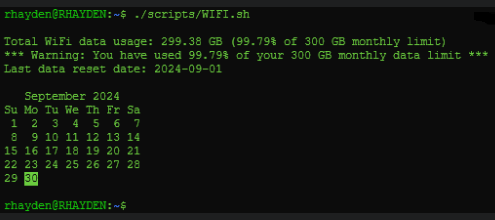
Total WiFi data usage: 269.12 GB (89.71% of 300 GB monthly limit)
*** Warning: You have used 89.71% of your 300 GB monthly data limit ***
Data usage for the current day: 2.11 GB
Total online time this month: 210:03:12
Total online time today: 03:42:18
Last data reset date: 2025-07-01